


More iPhone News
MANILA, Philippines - Globe Telecom, Inc. is banking on Apple’s third-generation (3G) iPhone to temper the effects on profits of declining consumption due to rising consumer prices.
The iPhone, exclusive to Globe subscribers, will hit stores on Aug. 22 and will cost P42,000 for the base eight-gigabyte model — four times the suggested retail price of $199 or less than P10,000 in the US.
In a press briefing Wednesday, Globe President Gerardo Ablaza said the introduction of the iPhone, coupled with the launch of value-added services, would drive company growth for the rest of the year.
An analyst said the iPhone would be received well, saying the price "would not stop the wave of fanaticism of Apple users." "The iPhone craze is one thing [Globe] can take advantage of," said Astro C. del Castillo of First Grade Holdings, Inc. He said Globe could sell up to a million iPhones.
Meanwhile, Mr. Ablaza said the company was disappointed that a record increase in subscribers in the second quarter had failed to translate into a proportionate hike in wireless revenues.
Its subscriber base grew by 1.5 million to over 22 million subscribers in the second quarter mainly due to the strong performance of the network’s low-cost brand, TM. But wireless revenues dipped by 2%. Mr. Ablaza said sales would likely settle in the low single digit for the year. The company hopes to do better as prices stabilize. — Paolo Luis G. Montecillo, BusinessWorld
Source: GMANews.TV
Showing posts with label iPhone 3g. Show all posts
Showing posts with label iPhone 3g. Show all posts
Saturday, September 6, 2008
Thursday, September 4, 2008
No Service

If you ever encounter a situation where your iPhone 3G says "No Service" but other phones nearby has, your iPhone is probably in for some trouble. Bad Infineon 3G chipset? Nyahhh!
Luckily, there are some troubleshooting steps that you can try first before calling AppleCare or your wireless carrier. The 6R's by Apple is still the best method of troubleshooting almost all issues but not all iPhone users doesnt know what it is. This entry will discuss the 6R's troubleshooting step you may want to stick to your mind as an iPhone user. This will save you a lot of time dealing with tech support 'cause they will ask you to do some steps included in the 6R's and all you need to say is "I've done that already." After completing the 6R's of troubleshooting and you are still experiencing the same issue, your iPhone may need service or is in hardware trouble.
The 6 R's of troubleshooting are: Recharge, Restart, Reset iPhone, Remove, Reset Settings, Restore.
On the next scenario, we will use the issue "No Service" as a classic example. We also need to use our troubleshooting intuition because not all of the 6R's are applicable in this scenario.
1. Recharge - May not applicable on this issue. This may be used if you're getting "No service" and low battery both at the same time.
2. Restart - A highly recommended first step. This should have been the first in Apples 6R's. You're iPhone could probably be frozen that's why it doesnt get service. Turn off and on the iPhone to restart.
3. Reset - If your iPhone is totally frozen and not getting service, Try pressing and holding the Home button and sleep/wake button for several seconds 'til you see the Apple logo. This step is sometimes called force reset or hard reset.
4. Remove - Totally not applicable step. I borrowed from Apple the next paragragp to explain what remove means.
If iPhone is not working as expected, it may be due to some of the content synced to it. Try selectively removing certain content that may be causing unexpected behavior such as contacts, calendars, songs, photos, videos, or podcasts.
To remove content, connect iPhone via USB and use iTunes to change the sync settings. Click on iPhone in the Source list, and select each tab to change what content is synced then click apply.
5. Reset Settings - The next paragraph is also borrowed from Apple.
Tap Settings > General > Reset > Reset All Settings
Note: This will reset all settings. No data or media will be deleted.
If that does not resolve your issue, try erasing all content and settings.
Tap Settings > General > Reset > Erase All Contents and Settings
Note: This will delete all media and data. All settings will be reset as well.
6. Restore - Your last resort for troubleshooting. The ultimate step that will tell if you need iPhone replacement. If issue still existaftera restore, you really need a new iPhone. Try restoring iPhone using the latest version of iTunes. Connect iPhone. When it appears in the Source list, click on Restore in the Summary tab.
Posted by Rouge
Monday, September 1, 2008
iTunes won't activate an iPhone that has IMEI: 004999010640000

The IMEI: 004999010640000 indicates a useless iPhone. That is the default IMEI for every iPhone and if restoring the iPhone doesn't fix your issue, return your iPhone back to the place of purchase.
To determine if you have this problem and your iPhone wont activate. Try to "slide for emergency" and then dial *#06# to get the IMEI, if the number displayed matches the number above, you are affected by this issue.
Friday, August 29, 2008
iPhone 3G Hardware specifications remains undisclosed

Are you curious about the iPhones hardware specifications? Like a computer, the iPhone 3G also has processor, memory (RAM), and storage capacity. The iPhone is a miniature Mac running on "iPhone OS" operating system. That's the reason why Apple claim its 5 years way ahead of all other phones in the market. Until now, if you visit the iPhone's specifications page, you won't be able to see the iPhone's processor speed or the amount of RAM installed. Only the storage capacity is used to describe your iPhone as 8GB or 16GB version.
The wikipedia entry for the iPhone has information about the iPhone's hardware components listed as below. Take note that these specifications came from other websites based on their skills in disassembling the device.
Processor: 620 MHz ARM 1176,underclocked to 412 MHz
RAM (Memory): 128MB DRAM
Storage: 8GB and 16GB
If only the iPhone's screen is large enough given the specs above, it can definitely run Mac OS X 10.4 or Windows XP with additional software tweaking. But you don't need to have that as the iPhone OS alone is terrific.
The wikipedia entry for the iPhone has information about the iPhone's hardware components listed as below. Take note that these specifications came from other websites based on their skills in disassembling the device.
Processor: 620 MHz ARM 1176,underclocked to 412 MHz
RAM (Memory): 128MB DRAM
Storage: 8GB and 16GB
If only the iPhone's screen is large enough given the specs above, it can definitely run Mac OS X 10.4 or Windows XP with additional software tweaking. But you don't need to have that as the iPhone OS alone is terrific.
Thursday, August 28, 2008
How to completely clean reinstall iTunes (Mac/Windows)

Often times you may experience issues with your iPhone 3G and iTunes. If you sync your iPhone, iTunes may indicate its syncing by displaying a little spinning arrow but your actual iPhone is idle and doesn't say that a sync is in progress. For this kind of issue, you may need to try reinstalling iTunes completely altogether with its subcomponents.
For Windows users
1. Completely close every program running on your PC including iTunes. Make sure that all USB devices like iPhone and iPod are not connected.
2. Open Control Panel > Add or Remove Programs... wait for the list to populate all the Programs on your computer. You should be able to find "iTunes" as one of the programs listed, select it and click on the remove button on the lower right corner. The process of uninstalling should begin immediately.
3. You will also need to uninstall the following programs. They are all included in the iTunes installation package.
* Apple Software Updater
* Apple Mobile Device Support
* Bonjour
* Quicktime
4. Restart your computer as requested.
5. To reinstall the latest version of iTunes, go to www.apple.com/itunes/download/
Save the file on your desktop for easy access.
6. The name of the iTunes installation file is "iTunesSetup.exe" just double click and run the program and wait until Installation finishes.
For All Mac Users
1. Quit all applications running
2. Open the Applications folder, put iTunes.app in the trash
3. Remove com.apple.itunes.plist located at Home folder\Library\Preferences\
4. Download the installer from apple.com/itunes/download and install
Sunday, August 24, 2008
More iPhone Launch News

As the international date line marched across the globe late last night, iPhones began going on sale in the Philippines and 21 other countries. TUAW reports that there was a sold-out party counting down until iPhones went on sale in the Philippines, the first of the latest batch of countries to launch the iPhone 3G. iPhones are reportedly selling well in India, despite high prices and lack of 3G networking. Unlocked iPhones are on sale in Greece, as is the law, starting at a hefty €459 (US$679), though opting for iPhone 500 super plus plan can shave off €176 (US$260).
iPhone 3G went on sale today in 22 additional countries, adding some 300 million potential customers.
Orange Poland, however, wasn't quite as optimistic. To "warm up the atmosphere around the launch of the iPhone," Orange marketers in that country apparently hired actors to pretend to be iPhone customers wanting in line, hoping to generate significant buzz. I'm no expert on the mobile market in Poland, so I can't vouch if such a move was necessary, but my gut tells me it wasn't. There certainly has been a buzz, though—about how lame of Orange it was to pull such a stunt.
Piper Jaffray analyst Gene Munster noted this morning that Apple has nearly doubled its potential market base with the addition of 22 countries, to a total of 660 million potential subscribers. Odds are good that if even a small percentage of that base opts for an iPhone, Apple will easily exceed even its own sales expectations. For his part, Munster remains bullish on iPhone sales projections, adding that "we believe shares of AAPL will trade on iPhone unit volumes for the next several quarters, so we expect the iPhone unit upside to be a positive catalyst for the stock."
Source: arstechnica.com
The iPhone Launch Party
Globe's iPhone Launch Party
According to one of the managers at the floor, Globe was able to activate and distribute over 600+ 3G iPhone in less than 3 hours.
A lady from Bulacan was the very first Globe iPhone customer, waiting in line at the open grounds of the Makati Stock Exchange as early as 3PM that afternoon.
Thousands more have reserved their iPhone 3G online and thru Globe hotlines and they’re expecting people lining up on all business centers around Metro Manila today. From what I heard, the most popular unit so far is the Black 16GB iPhone 3G. Majority of those who got an iPhone were customers claiming them as loyalty rewards.
Could this be the largest iPhone customer line in the world?
Source: TechBlog.com
Friday, August 22, 2008
It's Finally here

It's Finally Here...
The long wait is over. It's finally here. The iPhone 3G. Please review my previous post on how you can get started with the iPhone. I will post more articles in the coming days.
Wednesday, August 20, 2008
3G Connection Problems with iPhone may be Hardware related

In the US, more and more iPhone users are complaining about dropping calls, poor 3G reception, switching between 3G to EDGE while standing still, dropped calls when on 3G, and "no service" at all while on 3G. An analyst says that the problem could be the 3G chipset built on the iPhone and that no software update can fix it since the issue is the hardware itself. Apple has no comment or made any official statement about this issue.
If the issue is software, then a software or firmware update can eventually fix this problem. If the issue is about an immature 3G chipset then a product recall will solve this issue.
Overall the iPhone 3G works fine without 3G. You will love everything about the iPhone. Its a handy piece of Mac OS X and I love the idea that you can play games and download them for free. Forget about 3G. All we do here is to talk and text on the phone and 3G doesn't play an essential role on doing that.
For all the people waiting for Friday August 22nd. Go ahead and buy the phone. Although Apple is silent about this issue, I'm sure that Apple will stay behind its products and is dedicated to customer's satisfaction.
Tuesday, August 19, 2008
iPhone Software Update 2.0.2 now available
 Software Update for the iPhone 2.0.2 is now available in iTunes.
Looks like you've got an update to do right after purchasing your iPhone 3G coming August 22nd.
Apple did not enumerate any specific issues that the software update will fix except for "Bug fixes."
This update will definitely make the iPhone Hackers "Dev team" who just released their own patch August 10 to jailbreak 2.0.1 but it looks like they got more work to do now that the genuine 2.0.2 update is released monday night (August 18th, 2008) thats tuesday morning Manila time.
Top 10 things why Pinoys would not buy the iPhone 3G

Top 10 things why Pinoys would not buy the iPhone 3G
by Rouge
1. You cannot forward a funny joke or a quotable quote sent to you via text message. Yep! The phone doesnt have a "forward message" feature."
2. You cannot forward a text message to your Globe contacts on your distribution list. There is no option for forwarding to a group like your nokia phone does.
3. There is no video recording on the iPhone or any application that will do this function.
4. Still, the camera is a bit crappy at the same 2.0 Megapixel resolution.
5. You cannot transfer via bluetooth an Mp3 you download somewhere on the internet nor you can receive anything on bluetooth. The bluetooth is there for the purpose of pairing to a Bluetooth wireless headset (mono)
6. You cannot use any custom ringtone like you did before on your previous phone. You can only sync ringtones if you purchase it in iTunes. There's a lot of workaround you can do for this issue but it requires jailbreaking your phone.
7. No memory card expansion slots. You cannot store anything on this phone like you used to on your iPod's hard disk. But the iPhone itself has enough space for you to work with.
8. You cannot view any flash video from other sites on Safari (internet browser) except youtube. Youtube has converted millions of videos last year into mp4 format for it to be viewable on the built in app "Youtube"
9. No option to save a download file in Safari nor you can upload a file from your phone.
10. Budget. Taghirap. Poor. Ala pera. Kulang allowance. Mahal bigas, Taas gasolina, Problemang panlipunan, at iba pa.
Monday, August 18, 2008
Beware of iPhone with Plastic Cracks

The new iPhone 3G 16GB version will be available in 2 different colors, that is black and white (Apple loves these colors on their product). I'm not sure if the white version will be available here but I hope it does. More iPhone users are reporting about their phones showing some cracks on the back part, this is most noticeable on the part where the buttons are located. The cracks are even more noticeable on the white version because of the discoloration of the hairline crack. If you happen to purchase an iPhone and notice a crack, immediately return it to the Place of Purchase and reference your return to US users who were able to exchange their phones at an Apple store and walk away happy. If you purchase it in Greenhills then goodluck.
Posted by Rouge
reference: ilounge.com
Thursday, August 14, 2008
More Google fun on the iPhone...

Have you ever tried searching for your name on Google? Say your name is Dyesebel, if you try searching for that as a keyword in Google then a Wikipedia entry would come up as your top result plus thousand of other results. Try tweaking your search by adding some terms and you'll get interesting results.
Example: "si dyesebel ay" (don't forget to include the quotes)
Sample results:
1. ...si Dyesebel ay ipinadukot ito at ipinalabas sa mga karnabal.
2. ...si Dyesebel ay nagpunta sa din lupa. Pupuntahan ni Isabel si Fredo upang ipakita rito na si Cassandra ay nagpapanggap lamang
3. ...Si Dyesebel ay isang sirena sa nobelang komiks na nilikha ni Mars Ravelo noong dekada '50.
4. ...Si Dyesebel ay magiging ‘tuyo’ (dried fish) pero sa ngayon ay hindi pa sila hihinto at sine-savor pa rin nila ang moment nila sa telebisyon. ...
very interesting indeed...
Now, I played with the word iPhone in combination with other supporting words to make a phrase and this is what I've got...
I. "i love my iPhone because"
1. I love my iPhone because it is like a little mobile computer, iPod and phone in one. I love being able to see youtube, email, facebook and news on the fly. ...
2. I love my iphone because I use it for so much more then I thought I would with my business email account and getting directions to places on google maps. ...
3. I love my iPhone, because I am an ignorant child, female, or just want to be a poser, that's about it. Other than that it's pretty much a ...
4. I love my iPhone because it can find me starbucks faster than anyone else can and I can buy phat beats while ...
5. i love my iPhone because it has all my music and pictures EASLILY synced to them. With the blackjack I had to use Windows Media Player or another ...
Alright , lets see what this next search keyword would give us...
II. "i hate my iphone because"
1. I hate my iPhone because:. the 2 mega pixel camera s*cks; no video, i need video!!!!!! it's closed at the moment so there's no ShoZu, ...
2. I hate my iPhone because of Telcel. The responsible for bringing the 3G to Mexico. The idiots made a mistake while migrating my plan to the iPhone's plan ...
3. i hate my iphone because it costs sooo much and doesnt have a lot of features. also i hate it because i cant send pics and bluetooth transfers dont ...
4. I hate my iPhone because it can’t output crappy bit-rate videos to my HD TV! ...
Chill. 1 Week more to go and the iPhone will say hello. iPhone 3G coming August 22nd.
Posted by Rouge
Wednesday, August 13, 2008
What to expect inside the iPhone 3G Box

What to expect inside the iPhone 3G Box
iPhone 3G ships with the following accessories and in-box components:
- iPhone 3G
- SIM card from Globe
- Stereo headset with microphone
- Dock Connector to USB Cable
- USB power adapter
- Documentation
- Cleaning/polishing cloth
- SIM ejector tool
Take note that the iPhone 3G does not ship with a dock. You need to purchase this accessory separately. Due to the convex iPhone 3G shell, it does not fit in the original iPhone dock. In some countries, including the United States, the iPhone 3G ships with a redesigned USB power adapter. Offering a streamlined design, it does not feature a removable AC plug or retractable prongs.
In other countries, the iPhone 3G ships with a USB power adapter similar to the original iPhone, with a removable AC plug.
The version of the USB power adapter that ships with the iPhone 3G is compatible with electrical outlets in the country of purchase. The USB power adapter is auto-sensing and auto-switching, allowing you to use it with third-party power converters.Posted by Rouge
Tuesday, August 12, 2008
How does the GPS work on the iPhone 3G?


GPS feature on the iPhone3G, a brief introduction
Your iPhone3G requires an unobstructed view of the sky, so they are used only outdoors and they often do not perform well indoors or near tall buildings. To get accurate position, the iPhone 3G must be seen by at least 4 satellites orbiting the earth. You can trace your current location using the Google Maps application. Some apps utilizes GPS on your iPhone by adding your location info (longitude, latitude) into a Photos metadata, or simply use that info to calculate progress if you're using your iPhone for outdoor activities, the process is referred to as "Geotagging."
Learn more about the technology behind GPS in this wikipedia entry
Posted by: Rouge
Monday, August 11, 2008
iPhone software update 2.0.1 may cause issues on ringer volume

iPhone software update 2.0.1 on the original iPhone may cause issues on ringer volume. Users are reporting that ever since they've updated to the latest software version, ringer volume that has been set to max would suddenly go down to minimum. iPhone 3G users who have 2.0.1 does not experience this. If this happen to you, isolate the issue on your own by trying the following troubleshooting
1. Reboot your iPhone.
2. Try to check if you can feel a click when you press the volume buttons on the side. If the volume buttons feels like it doesnt resist and goes all the way up or down, then the problem could be on the volume buttons itself
3. Reset all Settings and check if issue still exist.
4. Remove all 3rd Party app and restart. You may also try to remove some other contents like music, videos and other iPod content.
5. RESTORE. Try using your iPhone without putting back any of your data except for the contacts.
6. If you already tried everything above and issue still persist, then the problem must be on the software update although the issue is not yet confirmed to be caused by the 2.0.1 release.
7. Pray and wait for the immediate release of 2.0.2
Rouge http://iphoneph.blogspot.com
Sunday, August 10, 2008
May iPhone 3G na sa 'Pinas

Isang iPhone 3G ang aking namataan sa aking paglalakad lakad sa kahabaan ng Megamall. Dun yun sa Cyberzone.Tiningnan ko, hmmm! nasa puting kahon. Malayo pa lang ay mukhang 16GB na ito dahil white lang ang available sa puting kahon. Sa likod ng kahon ay may itim pang kahon, mukhang 8GB. Magkano kaya ang benta nila dito? Di ko na tinanong yung nagbabantay dahil wala sa itsura ko ang bibili ng iPhone. Di ko narin tinanong kung may warranty dahil sa loob loob ko ay di pa naman opisyal ang pagdating ng iPhone dito. Sino kayang atat ang bibili nito? Basta, goodluck nalang sa makakabili.
How to create an iTunes App Store account without a credit card
As with the recent addition of our beloved country Philippines in the iTunes store, anyone who already own an iPhone and iPod touch with software version 2.0 can now download a growing list of free apps in the iTunes Apps store. But in order to succesfully download an App, you must have an iTunes App Store account. No redeem code nor credit card is necessary. This tutorial will guide you in creating an "iTunes Account"
Please follow the step by step process as described below, keep in mind that iTunes 7.7.1 or later must already be present in your Mac or PC

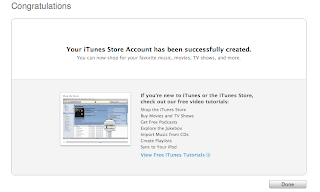
11. Once you click on the link, iTunes should then prompt you to sign in with your account name and password
12. You'll then see a "Congratulations" screen. Click Done to be taken to the App Store home page.
Create your account today
Please follow the step by step process as described below, keep in mind that iTunes 7.7.1 or later must already be present in your Mac or PC
- Access the App Store for your country. Click here to launch the Free App store
- Attempt to purchase a free appplication by clicking on "Get App"
- A window will pop out. Click create new account.
- Click continue.
- You'll need to read and agree to the iTunes terms and conditions, make sure you check the box next to where it says "I have read and agree to the iTunes Terms and Conditions." Click Continue.
- Enter in your email address, create your password, continue to create and answer your security question, then enter your birthday. Click Continue.
- Select "None" as the payment option.
- Continue to fill out the required name and address fields.
- You'll then see a screen that says 'Verify your Account'. Click Done and then check your email for a verification email from "iTunes Store."
- Open the mail, and click on the phobos link enclosed in the email to activate your account.


11. Once you click on the link, iTunes should then prompt you to sign in with your account name and password
12. You'll then see a "Congratulations" screen. Click Done to be taken to the App Store home page.
Create your account today
Saturday, August 9, 2008
iPhone 3G: AppleCare Protection Plan

Like a Mac or iPod, an AppleCare Protection Plan (APP) is also available for the iPhone 3G.
Taken from Apple's website, APP is explained here
**start**
Every iPhone comes with one year of hardware repair coverage and up to two years of technical support.(1) The AppleCare Protection Plan for iPhone extends your repair coverage to two years from the original purchase date of your iPhone.(2) Whether you use iPhone with a Mac or a PC, just one phone call can help resolve most issues.
Extend your coverage to two years of service and expert telephone support.

Peace of mind
Should your iPhone need service under the plan, Apple-authorized technicians will repair it or provide a replacement using genuine Apple parts.
We recommend that you purchase the AppleCare Protection Plan with your new iPhone to take maximum advantage of the coverage the plan provides. This plan is available for iPhone within its one-year limited warranty, used with either a Mac computer or a Windows PC.
- iPhone comes with up to two years of technical support during the term of your AT&T wireless contract. AppleCare Protection Plan benefits are in addition to any legal rights provided by consumer protection laws in your jurisdiction.
- This plan extends your service coverage to two years from the date of your iPhone purchase. The plan must be purchased while your iPhone is still under its original one-year warranty. Service coverage may be subject to certain restrictions.
The only thing I'm not sure is whether you can buy the AppleCare from Globe or if you have to go to an Authorized Apple Reseller. In the US, APP costs $69+tax but lets see how much will it retail here in the Philippines. You can't really guess by converting it as taxes and exchange rates puts additional digits to the equation. Tech support for the iPhone is directly from Globe so I'm sure they're already on training.
Subscribe to:
Posts (Atom)

 Posts
Posts


